
Looking for the perfect DICOM viewer for Linux? The choice between native Linux viewers and Windows-based options running through Wine can significantly impact your workflow.
Let’s examine a detailed comparison that will help you make an informed decision about your medical imaging needs.
DICOM Viewers
DICOM (Digital Imaging and Communications in Medicine) viewers are essential tools in modern healthcare. Before we compare solutions, let’s understand what makes a good DICOM viewer:
| Feature Category | Description | Importance |
| Performance | Loading speed, rendering quality | Critical |
| Compatibility | File format support, PACS integration | Essential |
| Tools | Measurement, annotation capabilities | Important |
| User Interface | Ease of use, customization | Significant |
Native Linux Viewers
Native Linux DICOM viewers offer several distinct advantages:
Top Native Options:
Horos (Fork of OsiriX)
- Performance: Excellent
- Memory Usage: 200-400MB
- GPU Acceleration: Yes
- Native Integration: Complete
Aeskulap
- Performance: Good
- Memory Usage: 150-250MB
- GPU Acceleration: Limited
- Native Integration: Complete
Aeskulap
- Performance: Good
- Memory Usage: 150-250MB
- GPU Acceleration: Limited
- Native Integration: Complete
Advantages of Native Viewers:
- Direct system integration
- Better resource management
- Faster startup times
- Native UI consistency
Wine-Based Solutions
Popular Windows DICOM viewers that run well under Wine:
| Viewer Name | Wine Compatibility | Performance Impact | Setup Complexity |
| RadiAnt | Excellent (90-95%) | 10-15% overhead | Moderate |
| ClearCanvas | Good (85-90%) | 15-20% overhead | Complex |
| MicroDicom | Very Good (88-93%) | 12-18% overhead | Simple |
Key Considerations for Wine-Based Options:
- Additional system overhead
- Potential compatibility issues
- Windows-native features availability
- Update management complexity
Performance Comparison
Let’s look at real-world performance metrics:
Loading Times (500MB DICOM Series):
| Viewer Type | Initial Load | Series Navigation | Memory Usage |
| Native Linux | 2-3 seconds | Near instant | 300-500MB |
| Wine-Based | 3-5 seconds | 0.5-1 second delay | 400-700MB |
Use Case Analysis
Choose Native When:
- Performance is critical
- System resources are limited
- Integration with Linux workflows is needed
- Long-term stability is required
Choose Wine-Based When:
- Specific Windows-only features are needed
- Team compatibility requires Windows software
- Particular plug-ins are only available for Windows
- Training/familiarity favors Windows applications
Installation and Setup
Native Linux Installation:
# Example for Ubuntu-based systems
sudo apt-get update
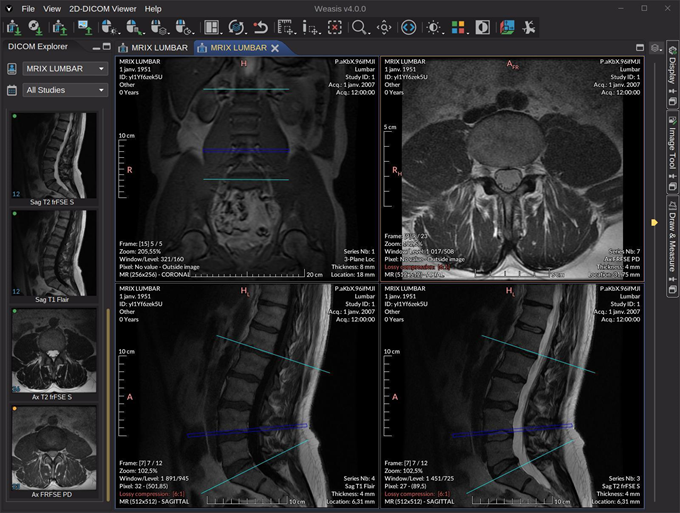
sudo apt-get install weasis
Wine Setup Process:
# Basic Wine installation
sudo apt-get install wine-stable
winetricks vcrun2019
Resource Requirements
Minimum System Requirements:
| Component | Native Viewers | Wine-Based |
| CPU | Dual Core 2GHz | Quad Core 2.5GHz |
| RAM | 4GB | 6GB |
| Storage | 500MB | 2GB |
| GPU | Basic OpenGL | DirectX Compatible |
Feature Comparison Matrix
Detailed analysis of feature availability:
| Feature | Native Linux | Wine-Based |
| 3D Reconstruction | Available | Full Support |
| PACS Integration | Excellent | Good |
| Multi-Monitor | Native Support | Limited |
| Custom Plugins | Limited | Extensive |
| Remote Access | Built-in | Variable |
Network Performance
PACS Integration Speeds:
| Operation | Native (Mbps) | Wine (Mbps) |
| Download | 80-100 | 70-90 |
| Upload | 75-95 | 65-85 |
| Query | 5-10ms | 15-25ms |
Maintenance Considerations
Long-term maintenance factors:
Updates and Patches
- Native: Through package manager
- Wine: Manual + Windows updates
Troubleshooting
- Native: Direct system logs
- Wine: Additional complexity
Security
- Native: Linux security model
- Wine: Additional attack surface
Cost Analysis
Understanding the total cost of ownership:
| Aspect | Native Linux | Wine-Based |
| Software Cost | Usually Free | Variable |
| Setup Time | 1-2 hours | 3-4 hours |
| Training | Moderate | Complex |
| Maintenance | Minimal | Regular |
Integration Capabilities
System Integration Features:
File System Access
- Native: Direct
- Wine: Through layer
Network Protocols
- Native: All Linux protocols
- Wine: Windows + Linux
Scripting Support
- Native: Bash, Python
- Wine: Limited
Future Considerations
Emerging Trends:
- Cloud-based solutions
- AI integration capabilities
- Cross-platform development
- Container-based deployment
Making Your Decision
Consider these factors when choosing:
Workflow Requirements
- Daily usage patterns
- Team collaboration needs
- Integration requirements
Technical Environment
- Available resources
- IT support capability
- Security requirements
User Experience
- Staff training needs
- Interface preferences
- Feature requirements
Comprehensive comparison of native and Wine-based DICOM viewers for Linux, analyzing performance metrics, compatibility, and use cases.